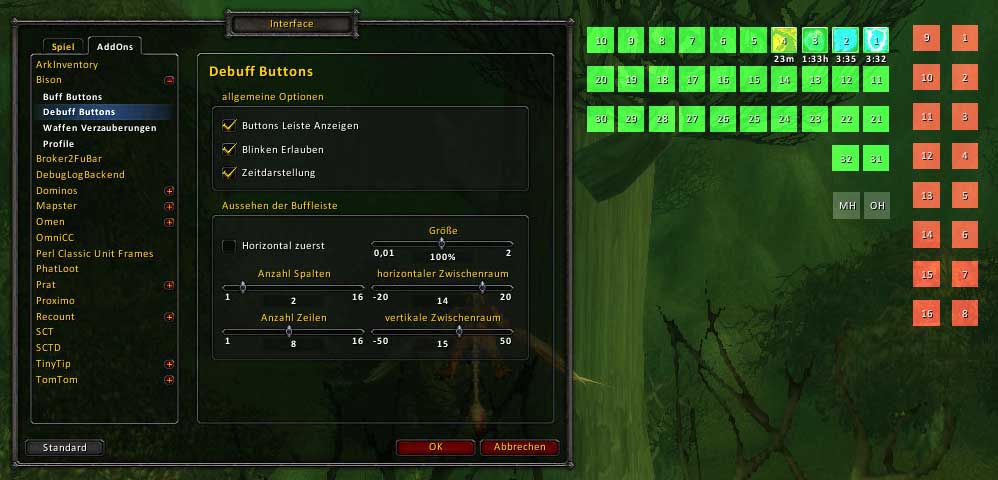
Bison
Customizing your buff display.
Features
- free position of all buff buttons
- support up to 40 buff buttons (the max size can be changed)
- individual selection of rows and cols for all buff bars
- individual selection of scale for all buff bars
- added ButtonFacade support
- added a first version of prog bar (spell id's can be shown on buff bar)
- added a small bar for combo points
Acknowledgement
The addon based on Nimbal Buffalo2.
Commands
/bison or /bi - open the configuration dialog for Bison
- lock - lock the buttons on the screen
- enable - enable or disable Bison
- for each bar: buff, debuff, weapon, hidden, prog
- show - show or hide the bar (default: show)
- timer - select the timer style for all bars (default: Bison style)
- flashing - enable flashing for all bars (default: enabled)
- scale value - the scale for the bar buttons (default: 100%)
- rows value - the rows for the bar
- cols value - the cols for the bar
- horizontal - the first direction for the bar buttons (default: horizontal)
- xPadding value - the horizontal space between the buttons (default: 5)
a negativ value change the direction of the bar
- yPadding value - the vertical space between the buttons (default: 15)
a negativ value change the direction of the bar
Now Bison use the same method like other addons by hijacking the Blizzard buff and debuff elements. So the cancel buff works well on these version.
I loved the addon SurgeTrack, but its dead. So I start my own surge bar :). I can not play all classes, so I inserted a limited count of temporary buffs. Blizzard show some of these as auras around the avatar. You can enable the spell id's on the buff bar, to find the id's of missing buffs (I need your help).
knowing addons with modules hiding buff frames
You should deactive the option for hiding Blizzard Buff/Debuff frames.
- Pitbull4 - Module "Hide Blizzard frames" (option 'Buff/Debuff')
- X-Perl - Module "Player Buffs" (folder 'Player' subframe 'Player Buffs' on top right)
- ShadowedUnitFrames - Module "Hide Blizzard" (option "hide buff frames", at last "/console reloadui")
Comments

-

Forge_User_71701812 Owner
-
View User Profile
-
Send Message
Posted Mar 12, 2013plez try get this working!!! amazing addon
-
View User Profile
-
Send Message
Posted Nov 11, 2012I miss this. now my buff Icons are in a stupid place =(
-
View User Profile
-
Send Message
Posted Oct 7, 2012I pray this gets updated. No other buff mod could ever replace this ;_;
-
View User Profile
-
Send Message
Posted Sep 22, 2012I would love for this to be updated. I can't find any other addon that offers the same look, the ability to sort based on duration, as well as the ability to click off buffs in combat.
-
View User Profile
-
Send Message
Posted Sep 12, 2012Discontinued? I loved this addon, anyway, thanks for the time I have had with it.
-
View User Profile
-
Send Message
Posted Sep 10, 2012Update please (
-
View User Profile
-
Send Message
Posted Sep 8, 2012needs an update bro
-
View User Profile
-
Send Message
Posted Sep 4, 2012Any chance of a update?
-
View User Profile
-
Send Message
Posted May 21, 2012I don't know if anything could be done but thought I would share that every time I enable the addon Bison I can't use Zygor's Talent Guide. I am also letting Zygor know as well because I love both your addons and really wish they would play nice together.
I disabled ALL addons and added them back slowly and was able to determine with 100% assuredness that it was Bison causing my Zygor errors on start up.
-
View User Profile
-
Send Message
Posted Jan 16, 2012I was wondering if you are still supporting this addon, or plan on an update. I use it all day every day and do not have any issues with it, even in 4.3 Patch of wow. However, I am using the addon Masque for button skinning purposes which the current version of Bison does not support. If you can update to support Masque, would be really cool. Thanks again for making a simple addon to move and resize the normal blizzard buffs.
-
View User Profile
-
Send Message
Posted Dec 31, 2011Thank you for an excellent add on.
Two questions (pardon if these are obvious):
1. What is the Prog bar used for? What buffs/debuffs go there?
2. Is there a way to integrate the weapon buffs into the main buffs for the player? (This is the Blizz default.)
-
View User Profile
-
Send Message
Posted Dec 21, 2011It's broken for me since 4.3. I can't see buff timers anymore :-(
Elkano's BuffBars seem to interfere as well, turned the option off there, but it didn't change anything.
[edit]... which was a problem of Blizzard not showing buff durations. Anyway, it would be nice if you could toggle this option inside Bison.
-
View User Profile
-
Send Message
Posted Nov 27, 2011i love this addon very much, but i have one problem with this addon.
actually i try to using this addon with do-timer or nugrunning, but its faild. i mean when i running do-timer, the bison is not showing.
i need your help thx.
-
View User Profile
-
Send Message
Posted Nov 26, 2011Hi, could you please update Bison? It says Out of Date here. I would appreciate it
-
View User Profile
-
Send Message
Posted Nov 14, 2011Bison show only buffs and debuffs of the player itself. For buffs and debuffs on your target please use other addons like PitBull.
-
View User Profile
-
Send Message
Posted Nov 11, 2011Question: Can Bison display / filter based upon whether the target is friendly or hostile?
ie: When I target a Boss, I want to see BIG Buffs above the target frame and little Debuffs below ... when I target a player, I want to see BIG Debuffs aove the target frame and little Buffs below. (DPS vs Healer mode essentially).
Does / Can Bison do that? Looking for a new buff/debuff mod. Satrina's used to do it, EBB doesn't and also doesn't appear to be maintained anymore.
Thanks
-
View User Profile
-
Send Message
Posted Oct 28, 2011Hey Devs,
I'm trying to find how to vertically flip the displays (so instead of growing DOWN it grows UP), but there doesn't seem to be an option for that; are you able to explain how to do this (if I'm missing something), or add this option in future releases please?
-
View User Profile
-
Send Message
Posted Oct 29, 2011Actually, I meant to ask about being able to mirror growth vertically or horizontally.
-
View User Profile
-
Send Message
Posted Nov 1, 2011Assign the bars at minus position and they should invert (so up instead of down, left instead of right).
-
View User Profile
-
Send Message
Posted Nov 7, 2011Some Masque (ButtonFacade) skins shove the timers into the center of the icons. Either don't use Masque on your buffs or find and test a new skin package that won't move them.
From personal use I know that all the skins in CleanUI are 'broken' in this reguard.