Baggins
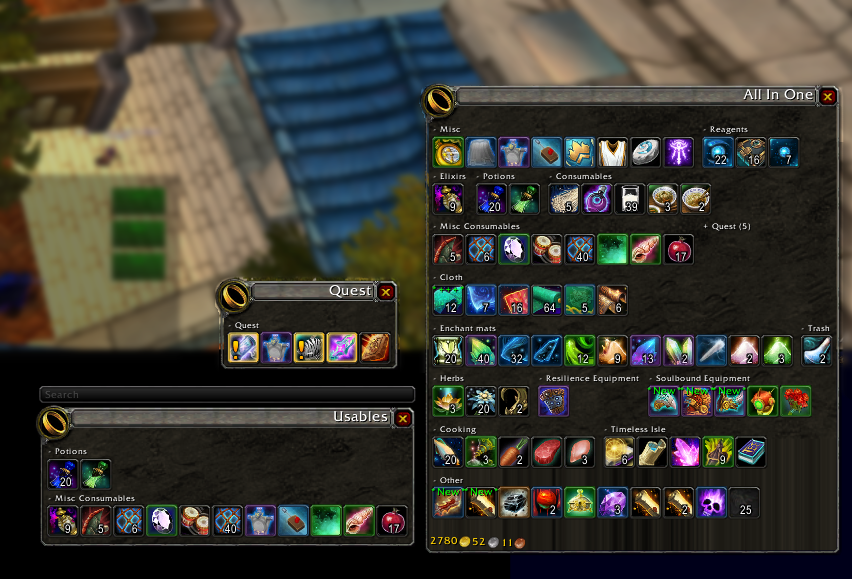
Inventory Management with virtual view divided into sections.
Now with baggins you can not only separate your bags into virtual view of your inventory but organize the items in your virtual view by item type! Bag options with endless possibilities. Add/remove/create categories, change skin of the view baggins does it all! Customize your bags to show items exactly how you like! No more looking for items and not being able to find them, look and know exactly where they should be!
For example one bag with profession items, one bag with gear, and so much more! You can even make your own categories!
You can use the minimap icon or /baggins to open the options window.
Comments

-

Doadin Owner
-

Forge_User_96189362 Author
-

wolfcon Contributor
-
View User Profile
-
Send Message
Posted Jun 10, 2026Since the latest update of baggins 5.8.5 update, I've been getting lag spike when moving items from the inventory to bank, selling items and mailing, basically any time i interact with baggins. I disabled all other addons and get the error baggins has exceeded its execution time limit.
-
View User Profile
-
Send Message
Posted Jan 24, 2026When right clicking usables I get a popup saying "Baggins has been blocked from an action only available to the Blizzard UI" and the following error. I then have to reload the UI to use items from bags.
1x [ADDON_ACTION_FORBIDDEN] AddOn 'Baggins' tried to call the protected function 'UseContainerItem()'.
[!BugGrabber/BugGrabber.lua]:583: in function '?'
[!BugGrabber/BugGrabber.lua]:507: in function <!BugGrabber/BugGrabber.lua:507>
[C]: in function 'UseContainerItem'
[Blizzard_UIPanels_Game/Mainline/ContainerFrame.lua]:1442: in function 'ContainerFrameItemButton_OnClick'
[Blizzard_UIPanels_Game/Mainline/ContainerFrame.lua]:1502: in function <...s/Blizzard_UIPanels_Game/Mainline/ContainerFrame.lua:1489>
Locals:
self = <table> {
}
event = "ADDON_ACTION_FORBIDDEN"
addonName = "Baggins"
addonFunc = "UseContainerItem()"
name = "Baggins"
badAddons = <table> {
Baggins = true
}
L = <table> {
ADDON_CALL_PROTECTED_MATCH = "^%[(.*)%] (AddOn '.*' tried to call the protected function '.*'.)$"
NO_DISPLAY_2 = "|cffffff00The standard display is called BugSack, and can probably be found on the same site where you found !BugGrabber.|r"
ERROR_DETECTED = "%s |cffffff00captured, click the link for more information.|r"
USAGE = "|cffffff00Usage: /buggrabber <1-%d>.|r"
BUGGRABBER_STOPPED = "|cffffff00There are too many errors in your UI. As a result, your game experience may be degraded. Disable or update the failing addons if you don't want to see this message again.|r"
STOP_NAG = "|cffffff00!BugGrabber will not nag about missing a display addon again until next patch.|r"
ADDON_DISABLED = "|cffffff00!BugGrabber and %s cannot coexist; %s has been forcefully disabled. If you want to, you may log out, disable !BugGrabber, and enable %s.|r"
NO_DISPLAY_STOP = "|cffffff00If you don't want to be reminded about this again, run /stopnag.|r"
NO_DISPLAY_1 = "|cffffff00You seem to be running !BugGrabber with no display addon to go along with it. Although a slash command is provided for accessing error reports, a display can help you manage these errors in a more convenient way.|r"
ERROR_UNABLE = "|cffffff00!BugGrabber is unable to retrieve errors from other players by itself. Please install BugSack or a similar display addon that might give you this functionality.|r"
ADDON_CALL_PROTECTED = "[%s] AddOn '%s' tried to call the protected function '%s'."
}
-
View User Profile
-
Send Message
Posted Mar 31, 2026In reply to TinfaceT: please let me know if you have any issues after updating to v5.8.2, thanks!
-
View User Profile
-
Send Message
Posted Jan 20, 2026Getting the following error on log-in (2 of 2 errors):
Message: ...nterface/AddOns/Baggins/src/filters/EquipmentSet.lua:32: attempt to call upvalue 'UnpackItemLocation' (a nil value)
Time: Tue Jan 20 21:17:53 2026
Count: 1
Stack:
[Interface/AddOns/Baggins/src/filters/EquipmentSet.lua]:32: in function <...nterface/AddOns/Baggins/src/filters/EquipmentSet.lua:30>
[Interface/AddOns/Baggins/src/filters/EquipmentSet.lua]:44: in function <...nterface/AddOns/Baggins/src/filters/EquipmentSet.lua:39>
[Interface/AddOns/Baggins/src/filters/EquipmentSet.lua]:169: in function <...nterface/AddOns/Baggins/src/filters/EquipmentSet.lua:167>
[Interface/AddOns/Baggins/src/filters/EquipmentSet.lua]:79: in function <...nterface/AddOns/Baggins/src/filters/EquipmentSet.lua:76>
Locals:
packedLoc = 1048577
(*temporary) = nil
(*temporary) = nil
(*temporary) = 1048577
(*temporary) = "attempt to call upvalue 'UnpackItemLocation' (a nil value)"
AddOn = <table> {
cannotDetachTooltip = true
modules = <table> {
}
defaultcategories = <table> {
}
defaultModuleState = true
minSpareItemButtons = 10
doInitialBankUpdate = true
hasIcon = "Interface\Icons\INV_Jewelry_Ring_03"
editOpts = <table> {
}
ptsetsdirty = false
obj = <table> {
}
hooks = <table> {
}
currentSkin = <table> {
}
itemcounts = <table> {
}
independentProfile = true
sectionOrderDirty = true
doInitialUpdate = true
OnMenuRequest = <table> {
}
opts = <table> {
}
db = <table> {
}
colors = <table> {
}
baseName = "Baggins"
enabledState = true
clickableTooltip = true
bagframes = <table> {
}
defaultModuleLibraries = <table> {
}
name = "Baggins"
hideWithoutStandby = true
orderedModules = <table> {
}
}
UnpackItemLocation = nil
-
View User Profile
-
Send Message
Posted Jan 22, 2026I've proposed a fix for this to the addon authors. Until a new version is published, you can fix this in your installation by modifying one file. Replace Baggins/src/filters/EquipmentSet.lua with this version: https://github.com/PeluxGit/Baggins/blob/fix/148-equipmentset-unpack/src/filters/EquipmentSet.lua
-
View User Profile
-
Send Message
Posted Jan 20, 2026Getting the following errors on log-in (1of2 errors)
Message: ...nterface/AddOns/Baggins/src/filters/EquipmentSet.lua:32: attempt to call upvalue 'UnpackItemLocation' (a nil value)
Time: Tue Jan 20 21:17:53 2026
Count: 1
Stack:
[Interface/AddOns/Ace3/AceAddon-3.0/AceAddon-3.0.lua]:523: in function 'EnableAddon'
[Interface/AddOns/Ace3/AceAddon-3.0/AceAddon-3.0.lua]:626: in function <Interface/AddOns/Ace3/AceAddon-3.0/AceAddon-3.0.lua:611>
Locals:
self = <table> {
initializequeue = <table> {
}
statuses = <table> {
}
embeds = <table> {
}
frame = AceAddon30Frame {
}
addons = <table> {
}
enablequeue = <table> {
}
}
addon = <table> {
cannotDetachTooltip = true
modules = <table> {
}
defaultcategories = <table> {
}
defaultModuleState = true
minSpareItemButtons = 10
doInitialBankUpdate = true
hasIcon = "Interface\Icons\INV_Jewelry_Ring_03"
editOpts = <table> {
}
ptsetsdirty = false
obj = <table> {
}
hooks = <table> {
}
currentSkin = <table> {
}
itemcounts = <table> {
}
independentProfile = true
sectionOrderDirty = true
doInitialUpdate = true
OnMenuRequest = <table> {
}
opts = <table> {
}
db = <table> {
}
colors = <table> {
}
baseName = "Baggins"
enabledState = true
clickableTooltip = true
bagframes = <table> {
}
defaultModuleLibraries = <table> {
}
name = "Baggins"
hideWithoutStandby = true
orderedModules = <table> {
}
}
AceAddon = <table> {
initializequeue = <table> {
}
statuses = <table> {
}
embeds = <table> {
}
frame = AceAddon30Frame {
}
addons = <table> {
}
enablequeue = <table> {
}
}
-
View User Profile
-
Send Message
Posted Oct 11, 2025Got this error when using Fractured Spark of Starlight (https://www.wowhead.com/item=231757/fractured-spark-of-starlight). Reload allows me to use it without error.
3x [ADDON_ACTION_FORBIDDEN] AddOn 'Baggins' tried to call the protected function 'UNKNOWN()'.
[Blizzard_UIPanels_Game/Mainline/ContainerFrame.lua]:1476: in function <...s/Blizzard_UIPanels_Game/Mainline/ContainerFrame.lua:1463>
Locals:
self = BagginsPooledItemButton152 {
IconOverlay = Texture {
}
slots = <table> {
}
AugmentBorderAnim = AnimationGroup {
}
showMatchHighlight = true
icon = BagginsPooledItemButton152IconTexture {
}
count = 5
HighlightTexture = Texture {
}
IconQuestTexture = BagginsPooledItemButton152IconQuestTexture {
}
hasItem = 1
PushedTexture = Texture {
}
isProfessionItem = false
flash = Texture {
}
emptyBackgroundAtlas = "bags-item-slot64"
Count = BagginsPooledItemButton152Count {
}
searchOverlay = BagginsPooledItemButton152SearchOverlay {
}
itemContextMatchResult = 3
newtext = BagginsPooledItemButton152NewText {
}
IconOverlay2 = Texture {
}
glow = Texture {
}
timeSinceUpgradeCheck = 0
flashAnim = AnimationGroup {
}
newitemglowAnim = AnimationGroup {
}
JunkIcon = Texture {
}
ExtendedSlot = Texture {
}
BattlepayItemTexture = Texture {
}
NewItemTexture = Texture {
}
isCraftedItem = false
AugmentBorderAnimTexture = Texture {
}
UpgradeIcon = Texture {
}
NormalTexture = BagginsPooledItemButton152NormalTexture {
}
IconBorder = Texture {
}
Cooldown = BagginsPooledItemButton152Cooldown {
}
ItemContextOverlay = Texture {
}
BagIndicator = Texture {
}
Stock = BagginsPooledItemButton152Stock {
}
readable = false
alwaysShowProfessionsQuality = true
}
button = "RightButton"
modifiedClick = false
-
View User Profile
-
Send Message
Posted Nov 7, 2025And this
2x Baggins/Baggins.lua:2985: attempt to call upvalue 'DepositReagentBank' (a nil value)
[Baggins/Baggins.lua]:2985: in function <Baggins/Baggins.lua:2984>
Locals:
(*temporary) = nil
(*temporary) = "attempt to call upvalue 'DepositReagentBank' (a nil value)"
DepositReagentBank = nil
-
View User Profile
-
Send Message
Posted Sep 10, 2025Since the last update both mine and my wifes' are having the same issue, it will open fine, but will not close by clicking the close (X) button, the B for All bags still Open/Closes the bags. Any thoughts? We are using this on WOWClassic/MOP
-
View User Profile
-
Send Message
Posted Sep 23, 2025In reply to drilonfrostienuts: sorry for the late responce, but I am not seeing this issue, that is not with character bags(did not test bank). Are you getting any errors? have you tried with other addons disabled?
-
View User Profile
-
Send Message
Posted Aug 23, 2025This is crashing the game, for me if Baggins is on WOW doesn't get past the login splash screen, or if I activate it while in game, when i change zones it hangs the game. It has done this since 11.2 went live,
-
View User Profile
-
Send Message
Posted Sep 23, 2025In reply to cmharb: I have been using it just fine on retail. Are you still having issues?
-
View User Profile
-
Send Message
Posted Aug 13, 2025Got a popup that Baggins blocked an action when I tried to open a Delver's Pouch of Reagents just now. Game forced me to disable the addon in order to open it. No error grabbed in Bug Sack, however.
-
View User Profile
-
Send Message
Posted Aug 8, 2025Thanks for all the work you are doing updating Baggins.
Since the 5.7.5 update in Retail I'm running into very long (1-2 min load times). This problem was not evident prior to this update and goes away when I disable Baggins.
-
View User Profile
-
Send Message
Posted Sep 23, 2025In reply to Dunamite: nothing in the changes from v5.7.4 to v5.7.5 would cause this, what is the last version you had that ddint cause this?
-
View User Profile
-
Send Message
Posted May 8, 2025there is still some lag, stutter "or bug" when open the Baggins addon everything is fine, letting it opened. but when opening the Character Screen (default hotkey c) it drops frames. Lets say max FPS is 120, it stutters for 1-2 seconds and drops to 112-114.
Can you fix this please? also AddonProfiler is showing lag spikes when doing this.
-
View User Profile
-
Send Message
Posted Sep 17, 2024First, let me say I love this add-on for the sorting ability alone. I do have an issue or two and a request.
Issue #1: Custom categories don't always work and items end up in "Other" until told to force refresh. I especially have this issue with my 'Teleportation' category I created using Tooltips.
Issue #2: Running the current version, Alt-B doesn't seem to open the default bags anymore. I have to disable the add-on to get to the default bags.
Feature request: Can you add an option to NOT use the add-on for bank related items? Between not knowing where the add-on stashed something and my OCD, I'd rather not use the add-on for my bank and only for my backpack(s).
Thanks!
-
View User Profile
-
Send Message
Posted Aug 25, 2024I am getting this error when trying to take something out of my bank and it prevents me from taking it out.
Message: bad argument #4 to '?' (Usage: C_Container.UseContainerItem(containerIndex, slotIndex [, unitToken, bankType, reagentBankOpen]))
Time: Sun Aug 25 10:52:39 2024
Count: 1bb
Stack: bad argument #4 to '?' (Usage: C_Container.UseContainerItem(containerIndex, slotIndex [, unitToken, bankType, reagentBankOpen]))
[string "=[C]"]: ?
[string "@Interface/AddOns/Baggins/Baggins.lua"]:2463: in function <Interface/AddOns/Baggins/Baggins.lua:2460>
Locals: (*temporary) = "bad argument #4 to '?' (Usage: C_Container.UseContainerItem(containerIndex, slotIndex [, unitToken, bankType, reagentBankOpen]))"
-
View User Profile
-
Send Message
Posted Aug 17, 2024Ever since the most recent update Baggins doesnt open anymore! Anyone else having this issue?
-
View User Profile
-
Send Message
Posted Aug 2, 2024Thanks for keeping this add-on going.
Since 11.0 was released I'm having the problem on Equipment Sets for other toons showing up in my bags when there is common loot (ie when on my mage I will be seeing the equipment set for my shadow priest, etc.). This is happening whenever there is common gear between two sets. Am I missing a new setting to get rid of this, or is there a workaround?