Broker_AuctionsToGo
Broker: AuctionsToGo
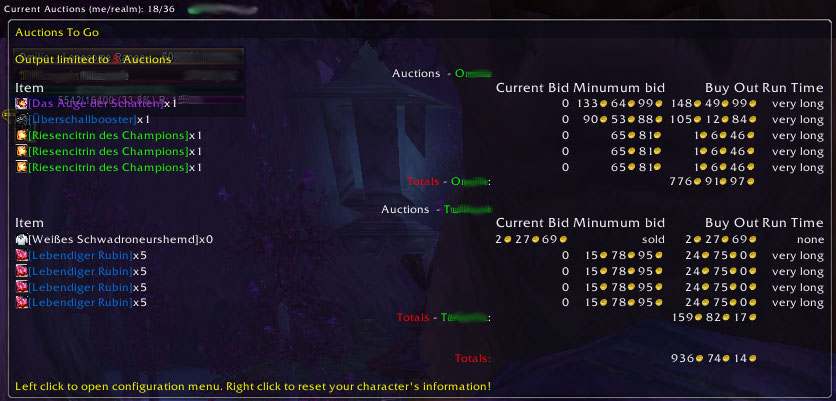
Ever wanted to remember which items you put into AH? AuctionsToGo is a small LDB-Addon, which will show you all your auctions on the current realm.
It currently is in a early beta state and does not have any fancy functions and only basic tooltip configuration. The rest is still to be done.
Or probably it isn't. I quit playing WoW today for time reasons, so I won't pursue any active development, though I will do bug fixes, but I will need somebody to test them, because my account is expired currently.
Comments

-

_ForgeUser155640 Owner
-
View User Profile
-
Send Message
Posted May 13, 2009Broker_AuctionsToGo-0.1-beta10\Broker_AuctionsToGo.lua:70: in function `GetPlayerNames'
Broker_AuctionsToGo-0.1-beta10\Broker_AuctionsToGo.lua:467: in function <...e\AddOns\Broker_AuctionsToGo\Broker_AuctionsToGo.lua:446>
(tail call): ?:
<in C code>: ?
<string>:"safecall Dispatcher[1]":9: in function <[string "safecall Dispatcher[1]"]:5>
(tail call): ?:
AceAddon-3.0-5 (Titan):531: in function `EnableAddon'
AceAddon-3.0-5 (Titan):621: in function <...face\AddOns\Titan\libs\AceAddon-3.0\AceAddon-3.0.lua:607>
<in C code>: in function `LoadAddOn'
Interface\FrameXML\UIParent.lua:229: in function `UIParentLoadAddOn':
Interface\FrameXML\UIParent.lua:252: in function `CombatLog_LoadUI':
Interface\FrameXML\UIParent.lua:497: in function <Interface\FrameXML\UIParent.lua:469>:
-
View User Profile
-
Send Message
Posted May 13, 2009-
View User Profile
-
Send Message
Posted May 14, 2009Should be working now. Sorry for mistakes like that, I still am learning, it's my first addon.
-
View User Profile
-
Send Message
Posted May 13, 2009[2009/05/13 07:08:11-141-x1]: Broker_AuctionsToGo-0.1-beta9\Broker_AuctionsToGo.lua:204: Usage: <unnamed>:SetScript("type", function)
Broker_AuctionsToGo-0.1-beta9\Broker_AuctionsToGo.lua:204: in function `OnLeave'
Broker2FuBar-1.0\pluginPrototype.lua:65: in function `OnFuBarLeave'
LibFuBarPlugin-3.0-90063:1328: in function <...FuBar\libs\LibFuBarPlugin-3.0\LibFuBarPlugin-3.0.lua:1325>
FuBar-3.0.90012\FuBar.lua:1241: in function <Interface\AddOns\FuBar\FuBar.lua:1238>
---
-
View User Profile
-
Send Message
Posted May 13, 2009-
View User Profile
-
Send Message
Posted May 6, 2009If you don't see the addon, do you have a ldb display installed, like DockingStation, Fortress or such? If you are using FuBar, do you have Broker2FuBar installed?
If so this should be straight forward. Unpack the zip to <Wow Installation Dir>\Interface\AddOns or install it via an updater like Curse Client.
After starting up WoW, make sure Broker_AuctionsToGo is enabled in WoW's Addon Management. After logging in you need to tell your ldb display to show Broker_AuctionsToGo and do the positioning. That's it.
Having a display is the crucial part, if you don't have one, http://wiki.github.com/tekkub/libdatabroker-1-1/ has a complete list, so you can choose the one you like best from it. I personally like something like FuBar and therefore use DockingStation.
You can see if AuctionsToGo is working at all by opening Interface Configuration ingame, switching over to addons. There you should finde a Category "Broker", opening that it will show you "AuctionsToGo" as sub category. If you can find that, Broker_AuctionsToGo should be running fine.
If there still is something unclear, please let me know.
-
View User Profile
-
Send Message
Posted May 6, 2009This still isn't working for me. I cannot seem to see the add-on. I installed beta8. Do I need to separately install Ace3? I have tried that, and when I type /ace3, I get a sort of config tool, but any changes I make produce an error.
Can you offer some clear, succinct text or images about what a user should be seeing to get this addon working, and where they should see it in game? Or any slash commands that should be used?
Thanks much.
-
View User Profile
-
Send Message
Posted Apr 18, 2009Should be fixed in 0.1-beta3. Please use the Ticket system for bug reporting.
-
View User Profile
-
Send Message
Posted Apr 18, 2009I get this error
Date: 2009-04-18 17:52:26 ID: 5 Error occured in: Global Count: 226 Message: ...e\AddOns\Broker_AuctionsToGo\Broker_AuctionsToGo.lua line 469: attempt to index field '?' (a nil value) Debug: (tail call): ? [C]: ? ...e\AddOns\Broker_AuctionsToGo\Broker_AuctionsToGo.lua:469: ...e\AddOns\Broker_AuctionsToGo\Broker_AuctionsToGo.lua:46
-
View User Profile
-
Send Message
Posted Apr 9, 2009-
View User Profile
-
Send Message
Posted Apr 9, 2009If you want to, you could open a ticket at http://www.wowace.com/projects/auctionstogo/tickets/ as a reminder.
I'm planning to take some time during easter holidays and get most of configuration done.
-
View User Profile
-
Send Message
Posted May 11, 2009I hope it relieves your situation a little bit. I still am thinking about other ways to improve data display.
-
View User Profile
-
Send Message
Posted Apr 4, 2009-
View User Profile
-
Send Message
Posted Apr 4, 2009It's in a very early state and there won't be any releases soon, but wowace has alpha files