442 - Error after porting (Zenzoroaster)
What steps will reproduce the problem?
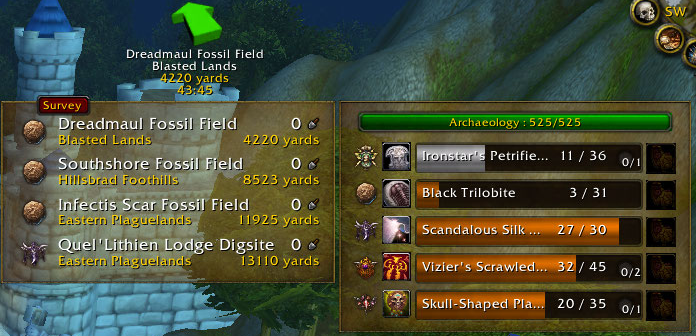
I am experiencing a problem whereby the tooltip (which is toggled ON in preferences; I checked) stops showing. I think this is happening after I change zones via teleport.
Once this disappearance occurs, whenever I mouseover the minimap button (as to invoke the tooltip) there is a momentary freeze of all action (as if the tooltip is trying to render), but then nothing shows up. Definitely a bug (or possibly a conflict with another addon).
Another issue, is with Tomtom support toggled ON, I get an error message asking me if I want to disable Tomtom's automatic waypoint setting or ignore the issue. Once ignore is clicked the warning no longer appears.
What is the expected output? What do you see instead?
the tooltip (which is toggled ON in preferences; I checked) stops showing
What version of the product are you using?
Do you have an error log of what happened?
Interface\AddOns\Archy\Archy.lua:1178: attempt to concatenate local 'continent_name' (a nil value)
Time: 11/06/12 10:05:58
Count: 5
Stack: Interface\AddOns\Archy\Archy.lua:1178: in function `LDBTooltipShow'
Interface\AddOns\Archy\Archy.lua:1316: in function `OnEnter'
...ce\AddOns\Archy\Libs\LibDBIcon-1.0\LibDBIcon-1.0.lua:93: in function <...ce\AddOns\Archy\Libs\LibDBIcon-1.0\LibDBIcon-1.0.lua:84>
Locals: self = <table> {
UpdatePlayerPosition = <function> defined @Interface\AddOns\Archy\Archy.lua:2923
SetDefaultModuleLibraries = <function> defined @Interface\AddOns\Archy\Libs\AceAddon-3.0\AceAddon-3.0.lua:383
SetSinkStorage = <function> defined @Interface\AddOns\Archy\Libs\LibSink-2.0\LibSink-2.0.lua:752
EnableModule = <function> defined @Interface\AddOns\Archy\Libs\AceAddon-3.0\AceAddon-3.0.lua:348
modules = <table> {
}
CancelTimer = <function> defined @Interface\AddOns\Archy\Libs\AceTimer-3.0\AceTimer-3.0.lua:311
IterateEmbeds = <function> defined @Interface\AddOns\Archy\Libs\AceAddon-3.0\AceAddon-3.0.lua:458
SecureHookScript = <function> defined @Interface\AddOns\Archy\Libs\AceHook-3.0\AceHook-3.0.lua:413
SocketClicked = <function> defined @Interface\AddOns\Archy\Archy.lua:1500
RawHookScript = <function> defined @Interface\AddOns\Archy\Libs\AceHook-3.0\AceHook-3.0.lua:398
Printf = <function> defined @Interface\AddOns\Archy\Libs\AceConsole-3.0\AceConsole-3.0.lua:69
SetDefaultModulePrototype = <function> defined @Interface\AddOns\Archy\Libs\AceAddon-3.0\AceAddon-3.0.lua:425
GetSinkAce3OptionsDataTable = <function> defined @Interface\AddOns\Archy\Libs\LibSink-2.0\LibSink-2.0.lua:603
FindForCrate = <function> defined @Interface\AddOns\Archy\Archy.lua:2615
defaultModuleState = true
SpawnToast = <function> defined @Interface\AddOns\Archy\Libs\LibToast-1.0\LibToast-1.0.lua:428
IsEnabled = <function> defined @Interface\AddOns\Archy\Libs\AceAddon-3.0\AceAddon-3.0.lua:467
ScheduleTimer = <function> defined @Interface\AddOns\Archy\Libs\AceTimer-3.0\AceTimer-3.0.lua:276
DisableModule = <function> defined @Interface\AddOns\Archy\Libs\AceAddon-3.0\AceAddon-3.0.lua:366
ADDON_LOADED = <function> defined @Interface\AddOns\Archy\Archy.lua:2519
RegisterMessage = <function> defined @Interface\AddOns\TomTom\libs\CallbackHandler-1.0\CallbackHandler-1.0.lua:118
UnregisterMessage = <function> defined @Interface\AddOns\TomTom\libs\CallbackHandler-1.0\CallbackHandler-1.0.lua:181
RegisterBucketEvent = <function> defined @Interface\AddOns\Archy\Libs\AceBucket-3.0\AceBucket-3.0.lua:213
UNIT_SPELLCAST_SENT = <function> defined @Interface\AddOns\Archy\Archy.lua:2831
hooks = <table> {
}
BAG_UPDATE_DELAYED = <function> defined @Interface\AddOns\Archy\Archy.lua:2650
db = <table> {
}
optionsFrame = <unnamed> {
}
UpdateDigSiteFrame = <function> defined @Interface\AddOns\Archy\Archy.lua:3475
baseName = "Archy"
SetEnabledState = <function> defined @Interface\AddOns\Archy\Libs\AceAddon-3.0\AceAddon-3.0.lua:440
Hook = <function> defined @Interface\AddOns\Archy\Libs\AceHook-3.0\AceHook-3.0.lua:277
enabledState = true
SetupOptions = <function> defined @Interface\AddOns\Archy\Config.lua:1464
RegisterEvent = <function> defined @Interface\AddOns\TomTom\libs\CallbackHandler-1.0\CallbackHandler-1.0.lua:118
SolveAnyArtifact = <function> defined @Interface\AddOns\Archy\Archy.lua:1485
SaveFramePosition = <function> defined @Interface\AddOns\Archy\Archy.lua:3775
SetFramePosition = <function> defined @Interface\AddOns\Archy\Archy.lua:3745
SetDefaultModuleState = <function> defined @Interface\AddOns\Archy\Libs\AceAddon-3.0\AceAddon-3.0.lua:403
IterateModules = <function> defined @Interface\AddOns\Archy\Libs\AceAddon-3.0\AceAddon-3.0.lua:453
ResizeGraphicalDigSiteDisplay = <function> defined @Interface\AddOns\Archy\Archy.lua:3625
RawHook = <function> defined @Interface\AddOns\Archy\Libs\AceHook-3.0\AceHook-3.0.lua:316
ARTIFACT_COMPLETE = <function> defined @Interface\AddOns\Archy\Archy.lua:2549
OnEnable = <function> def
Please provide any additional information below.
| User | When | Change |
|---|---|---|
| Dridzt | Nov 07, 2012 at 02:44 UTC | Create |
- 3 comments
- 3 comments
- Reply
- #3
Dridzt Nov 23, 2012 at 08:48 UTC - 0 likesUnfortunately I've been ill in the past week and can't really work on addons. (high fever and staring at a monitor don't mix well)
It looks like your problem is with the TomTom integration so I'll take a little time to give you more details on that.
The issue is not with having TomTom integration enabled; that is fine.
What is breaking Archy is a specific feature of TomTom: "Enable automatic quest objective waypoints"
This is when TomTom automatically sets a waypoint arrow pointing to the closest tracked quest objective.
Additionally the problem only appears when you actually have tracked quests on the continent.
There's 2 ways to workaround the issue:
1. Open the questlog and untrack any quests on the current continent.
2. Disable the quest automation from TomTom options (not Archy options).
Now about the 3 buttons on Archy's warning dialog:
Yes = Archy will try to uncheck the problematic TomTom setting itself.
No = Archy will leave it alone but will warn you again in next play session.
Ignore = Archy will leave it alone and will not warn you again until next version.
- Reply
- #2
Zenzoroaster Nov 19, 2012 at 15:14 UTC - 0 likesAdditionally, the Digsites window issue only seems to manifest under Graphical mode, but will persist if, once manifested, I change from Graphical to Minimal. Reloading with the setting on Minimal will produce a Digsite window. Then, going to preferences, and selecting Graphical (reloads the UI) results in yet again a disappeared Digsites. Relaunching WoW is the only way I have been able to produce a Digsites window under graphical, but this is not 100%. Again, must stress that this issue is not yielding any LUA message.
- Reply
- #1
Zenzoroaster Nov 19, 2012 at 15:05 UTC - 0 likesAm still experiencing this under v. 1.8.38a. Additionally, since this update I am experiencing:
1) The Digsites window disappears/fails to load. Reloading UI and/or entirely restarting the game does not consistently clear this. Neither does resetting Archy profile. Have tried many many many MANY times with mixed results.
2) TomTom support is OFF, yet I now see that warning dialogue regarding automatic waypoint setting, blah blah blah would you like to disable or ignore... I have been clicking NO which I would presume is functionally different from IGNORE, i.e., the dialogue should then appear each time I load the UI. Yet it does not repeat unless and until (as in pursuance of the digsites issue above) I reset Archy.
Neither of these two new issues has (for me) produced a LUA message.