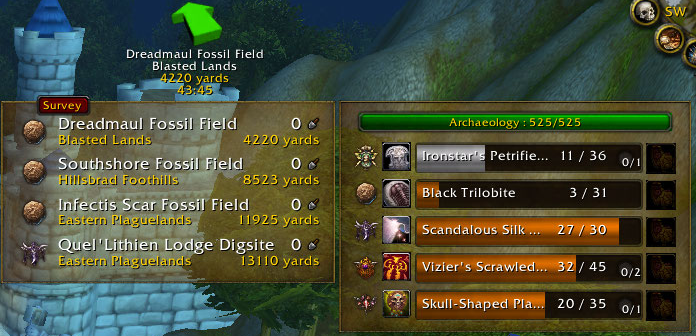
Archy is an assistant for Archaeologists that want information at their finger tips.
Translators: http:www.wowace.com/addons/archy/localization/
Bug reports/suggestions: WoWAce Tickets system
Bugs reported in comments will be deleted.
Features
- Localized for English, French, German, Russian, Spanish, and Traditional Chinese users
- On-screen customizable and movable list for the dig sites on the continent you are current on
- On-screen customizable and movable list of the artifacts you are researching that can be filtered to display only the races for the continent you are on
- Racial fragment types are shown for each of the dig sites
- Solve artifacts with (left click) or without (right click) keystones by clicking on the racial crest icon in the on-screen artifacts list or bind a key for a one stop solve shop
- TomTom support to help you navigate between dig sites
- Able to display dig sites on the minimap (closest only or all dig sites)
- Able to display dig site boundaries on the battlefield mini map
- Blacklist dig sites in the on-screen digsite list by right clicking on the dig site name. Perfect for when you have a bugged node or a dig site that is in a zone that you dislike.
- Blacklist races so they do not appear in your artifacts on-screen list and won't be used when the artifact solve keybind is pressed
- Sound triggers for when you have enough fragments and/or keystones to solve an artifact
- A dig recorder to see where at a dig site you have successful dug
- LDB Tooltip showing missing rare artifacts per race and overall archaeology progress
- many more features
Minimap Button Frame and other similar addons
All Minimap based frames (such as nodes, dig sites and dig site boundaries) have been prefixed now with ArchyMinimap
To stop these addons from taking these frames from the minimap, add the following item to their protected items list: ArchyMinimap
Mini-Guide to Fewer Digs
Facts
- Date created
- Oct 16, 2010
- Categories
- Last update
- May 22, 2013
- Development stage
- Release
- Language
- deDE
- enUS
- frFR
- ruRU
- License
- GNU Lesser General Public License version 2.1 (LGPLv2.1)
- Curse link
- Archy - Archaeology Assistant
- Downloads
- 5,383,539
- Recent files
- R: 1.8.42 for 5.3.0 May 22, 2013
- A: 1.8.41-5-geb61657 for 5.3.0 May 22, 2013
- A: 1.8.41-4-g1c159b9 for 5.3.0 May 22, 2013
- A: 1.8.41-3-g52deb7e for 5.2.0 Apr 10, 2013
- R: 1.8.41 for 5.2.0 Mar 31, 2013
Relationships
- Tool used
- Astrolabe
- Optional dependency
- TomTom
- Embedded library
- Ace3
- AceGUI-3.0-SharedMediaWidgets
- CallbackHandler-1.0
- LibAboutPanel
- LibBabble-Artifacts-3.0
- LibBabble-DigSites-3.0
- LibDBIcon-1.0
- LibDialog-1.0
- LibQTip-1.0
- LibSharedMedia-3.0
- LibSink-2.0
- LibStub
- LibToast-1.0
- Reply
- #98
Dridzt Mar 12, 2012 at 19:18 UTC - 0 likesA general comment and little guide about fragment discovery :-)
I've always found that simple logic helps much more in limiting the amount of digs necessary.
We already know that the furthest away a fragment is from the location where you do the survey, the direction accuracy is also diminished.
That's to say:
is pointing.
- Green = 5-40y and directly where the
- Yellow = 40-80y and at a narrow angle.
- Red = 80y+ and at a potentially very wide angle.
I'm also going to assume that unless you are a druid with flight-form you run to green and yellow fragments and mount/fly for red.
Knowing the above you can with 2 very simple "tricks" limit the amount of digs and time spent finding red fragments.
1. Double-survey Red: When your survey gets a Red theodolite, do another survey on the spot.
This allows you to limit the angle variance significantly
If you get ↑ ↑
both theodolites pointing same direction, there's good chances the fragment is that-a-way
If you get \ /
Theodolites pointing at an angle to each other, there's good chances the fragment is toward where the angle they form splits
2. Vary your red travel distance: Based on whether you got 2 red theodolites that align from (1) or at an angle between them vary your travel distance. (Archy's distance indicator bubble will help you see how far from the last survey you've moved)
a. Second theodolite you spawned at the same place aligns perfectly with the first: Go 90-100y towards the direction they're both pointing.
b. Second red theodolite you spawned is at an angle to the first: Go at least red+yellow to red+red distance away towards the split of their angle 140-160y.
Both those things together will limit the amount of digs you have to do until you get to the green zone significantly.
Try it out ;-)
- Reply
- #97
Dridzt Mar 12, 2012 at 09:27 UTC - 0 likes@diet6: Go
It's not so simple unfortunately.
The code that runs at the moment does a quick pass over the stored survey nodes of a specific dig site when a new one is discovered and checks its distance from the rest.
That way it determines if it should add it to the table (no other node is closer than 10y) or just ignore it.
That is relatively 'cheap'.
For that logic to work on all the database nodes it would require a monster loop checking each existing node in a digsite, then if it overlaps remove it which changes the collection so next one needs to be checked against all remaining and so on...
- Reply
- #96
diet6 Mar 11, 2012 at 21:43 UTC - 0 likes@Dridzt: Go
Yes, this is directly the issues I have been running into, I was using a database I put together from a handful of files. Though if the code is already in place is there any ways to make it so you can run that code on an already existing database? I'm not entirely sure how difficult that would be, but it'd be kind of nice to have a database available. I had lost my saved variable lua, so I had been working on recovering a list of nodes from different sources. After I realized that many of the nodes were copies I looked into parsing the data from gathermate (since it has a database trimming feature) into something archy could use, but the formats seems considerably different.
I realize this is probably a back burner issue, but I just thought I'd check and see if it's something that could get added. I know many people would like to have a method to share nodes / be able to import databases of nodes. In my case I would just need a way to clean up the file. I suppose I could just write a javascript or something to do it, but it might be a nice native feature.
- Reply
- #95
Dridzt Mar 11, 2012 at 18:10 UTC - 0 likes@diet6: Go
I checked this and Archy already has code in place to only add nodes that are 10y or more distant from an existing one.
Maybe it's leftover data from an older version of Archy that didn't work like that?
Or imported data? (there used to be a site offering archy databases for download and import).
- Reply
- #94
diet6 Mar 11, 2012 at 01:11 UTC - 0 likesWould it be possible to import gathermate data to archy? Or if not, implement a method for nodes that are near each other to be "cleaned up" into a single node? My game lags pretty hard in zones where I've dug a lot, and even though there's only maybe 20 spots for fragments to show up, I have like 200 data points since each node has a bunch of marks all on top of each other that are just barely separated.
- Reply
- #93
user_650047 Feb 13, 2012 at 16:21 UTC - 0 likesOMG , The digsite is functioning again on the minibattlemap. A millions thanks.!! U guys are the best
- Reply
- #92
user_650047 Feb 09, 2012 at 13:22 UTC - 0 likesHi, I really love this addon. however, is it possible to add the digsite on the small minimap so i dont have to keep opening the big map to see where i need to fly to on my next location? Really miss that old function
- Reply
- #91
Torhal Feb 08, 2012 at 03:56 UTC - 0 likes@huldu: Go
TomTom.
- Reply
- #89
yunohu Feb 01, 2012 at 18:37 UTC - 0 likesNew rare/common artifact solved information in the tooltip is awesome, thank you!
- Reply
- #88
huldu Jan 28, 2012 at 10:23 UTC - 0 likesI'm just curious, how would you add a distance/time gadget to this addon? I looked through the code but i have no clue what to do. I found the variable nearestSite.distance, which i guess is the one that calls out how far away the dig site is in yards. But i don't get much further than that, in WoW i have a script that checks the current speed of the player. Combining those two would give an estimated time to reach the dig site. I really wish Arch had an estimated time showing up, since most of the time you're flying and you wonder if you have enough time to grab something to eat without pulling out the calculator.