Analyst
About Analyst
Analyst collects information about the virtual economy and presents that information to the player. In its Economy panel, Analyst answers questions such as the following:
- How much gold did I earn and how?
- How much gold did I spend and on what?
- How am I doing in the auction house?
- What have I looted from mobs?
- What items did I consume?
- What items did I produce?
- How many currencies (marks, badges, emblems) have I collected?
- What have I deposited or withdrawn from the guild bank?
- What is my gathering and crafting activity?
- ... and much more
All reports can be shown over a configurable period (days, weeks, month).
Screenshots
The Economy panel lets you choose between the various reports offered by Analyst. Also, the reporting period of time can be chosen. Central information is displayed in the top frame. Data from two selected reports in shown in the bottom frames.
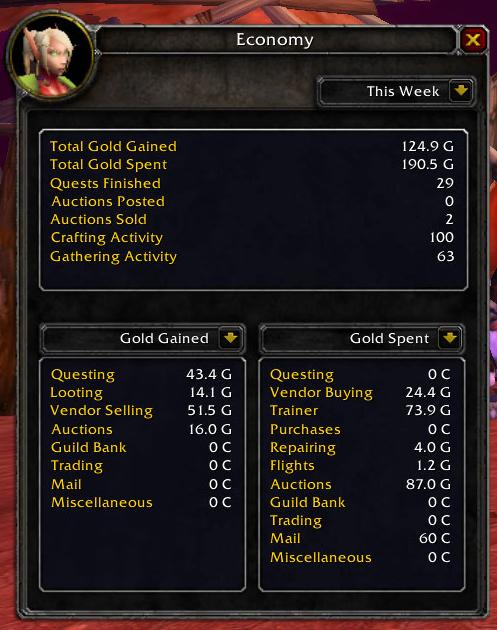
For the This Week report, the start day of week can be configured in the options. For example, a raid player may want to set the start day of week to the beginning of the raid ID period.
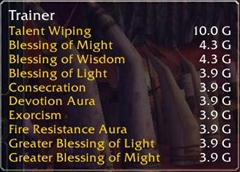
If you mouseover a statistic item, a tooltip provides detailed drill-down information on that statistic:
Usage
If you have a Lightweight Data Broker (LDB) container add-on such as Titan Panel, Analyst shows in that container. Left-clicking the Analyst icon toggles the Economy panel; right-clicking the icon shows the options.
If you do not have an LDB container, type /analyst economy to toggle the Economy panel and /analyst options to show the options.
Analyst provides a key binding to toggle the Economy panel. You may want to assign a key to that binding to gain quick access to Analyst.
Comments


-

BethinkOnTwitch Owner
-
View User Profile
-
Send Message
Posted Feb 12, 2020I've been using this addon for years. It starting throwing errors a while ago, and I disabled it until I had a chance to poke at it. I had to reinstall my entire machine this past weekend (RIP disk drive) and here is the current error. I don't suppose it will ever come back?
Date: 2020-02-12 23:09:21
ID: 7
Error occured in: Global
Count: 1
Message: ..\AddOns\Analyst\Capture.lua line 255:
Usage: SecureHook([object], method, [handler]): Attempting to hook a non existing target
Debug:
[string "=[C]"]: ?
[string "@Ace3\AceHook-3.0\AceHook-3.0.lua"]:211:
Ace3\AceHook-3.0\AceHook-3.0.lua:118
[string "@Ace3\AceHook-3.0\AceHook-3.0.lua"]:341: SecureHook()
[string "@Analyst\Capture.lua"]:255: EnableCapture()
[string "@Analyst\Analyst.lua"]:160:
Analyst\Analyst.lua:158
[string "=[C]"]: ?
[string "@Ace3\AceAddon-3.0\AceAddon-3.0.lua"]:70:
Ace3\AceAddon-3.0\AceAddon-3.0.lua:65
[string "@Ace3\AceAddon-3.0\AceAddon-3.0.lua"]:527: EnableAddon()
[string "@Ace3\AceAddon-3.0\AceAddon-3.0.lua"]:620:
Ace3\AceAddon-3.0\AceAddon-3.0.lua:605
[string "=[C]"]: ?
[string "=[C]"]: LoadAddOn()
[string "@..\FrameXML\UIParent.lua"]:457: UIParentLoadAddOn()
[string "@..\FrameXML\UIParent.lua"]:504: CombatLog_LoadUI()
[string "@..\FrameXML\UIParent.lua"]:1268:
..\FrameXML\UIParent.lua:1164
Locals:
None
AddOns:
LIST OF ADDONS REMOVED FOR LENGTH
BlizRuntimeLib_enUS v8.3.0.80300 <none>
(ck=14e3)
-
View User Profile
-
Send Message
Posted Dec 22, 2018Despite the fix for 8.0.1, this still has the caluclation Auction House flaw I mentioned 2 years ago.
Say for example lets say you sell an old world recipe for 20 gold. The Auction House cut will be 1 gold. Your net profit is 19 gold. You are returned whatever the deposit was - in this case, 5 silver, 25 copper - so in total, you receive 19 gold, 5 silver, 25 copper; but for some reason Analyst records 20.1g profit or 20gold, 10 silver.
This is just wrong. Firstly, it's recording the whole profit value, and not calculation the loss for the Auction House cut, and secondly where does the 10 silver even come from? Technically the refunded deposit isn't profit, so it shouldn't even be calculated, but even if it is (since I imagine the deposit would be calculated as a loss) it should be 5 silver, 25 copper, not 10 silver which is almost double the amount.
EDIT - I switched to Accountant Classic. Does pretty much the same thing, doesn't get the math wrong.
-
View User Profile
-
Send Message
Posted May 12, 2018Pretty sure this is broken now. The add-on is still registering for some transactions, but it's not working in other areas, such as the AH. Posting items still registers the costs, and when it wants to it registers income from sales, but it will randomly miss sales incomes at times for some reason. Sold a ton of 200 stack linen cloth, and none of the registered, while one-off gear sales did.
The author told me (when I asked) they do intend on working on the add-om again, so for now it's on the unloaded list until then.
-
View User Profile
-
Send Message
Posted Nov 13, 2016Editing the .toc file should be enough to get this working for 7.1.0 for now, although this is by no means a proper fix
EDIT
Maybe this will help towards figuring out the issues
Date: 2016-11-14 10:02:41
ID: 1
Error occured in: AddOn: Analyst
Count: 1
Message: Note: AddOn Analyst attempted to call a protected function (CompactRaidFrame2:ClearAllPoints()) during combat lockdown.
Debug:
[C]: ClearAllPoints()
..\FrameXML\FlowContainer.lua:157: FlowContainer_DoLayout()
..\FrameXML\FlowContainer.lua:17: FlowContainer_ResumeUpdates()
...actRaidFrames\Blizzard_CompactRaidFrameContainer.lua:185: CompactRaidFrameContainer_LayoutFrames()
...actRaidFrames\Blizzard_CompactRaidFrameContainer.lua:130: CompactRaidFrameContainer_TryUpdate()
...actRaidFrames\Blizzard_CompactRaidFrameContainer.lua:57: CompactRaidFrameContainer_OnEvent()
[string "*:OnEvent"]:1:
[string "*:OnEvent"]:1
Locals:
None
AddOns:
Swatter, v7.0.3 (<%codename%>)
NPCScanOverlay, v7.1.0.1
Analyst, v1.4.0
Armory, vv13.3.0
ArmoryGuildBank, vv13.3.0
Auctionator, v4.0.16
Babylonian, v5.1.DEV.332(/embedded)
ButtonForge, v0.9.46
CloudyTooltipMod, v2.6
CloudyTweaks, v2.2
CloudyUnitInfo, v2.6
Configator, v5.1.DEV.406(/embedded)
EasyMail, v
Gatherer, v7.0.3
Grail, v083
GrailAchievements, v011
GrailQuestsenUS, v22810
GrailReputations, v007
GrailWhen, v001
HandyNotes, vv1.4.11
HandyNotesDraenorTreasures, v1.20a
HandyNotesDungeonLocations, v1.06
HandyNotesLegionRaresTreasures, v1.01b
HandyNotesLostAndFound, v1
HandyNotesTimelessTreasures, v1.0.7
HandyNotesWorldMapButton, v2.6
HealersHaveToDie, v2.4.3
MogIt, v3.6.5
MyRolePlay, v7.1.0.405
SavedInstances, v7.0.6
SilverDragon, vv3.2.9
Skada, v1.5-14
SlideBar, v7.0.3 (<%codename%>)
Wholly, v060
WIM, v3.7.10
Wyr3dIcyVeinsStats, v
BlizRuntimeLib_enUS v7.1.0.70100 <none>
(ck=3bf)
Date: 2016-11-14 10:09:35
ID: 17
Error occured in: Global
Count: 1
Message: ..\AddOns\Analyst\Capture.lua line 2156:
attempt to perform arithmetic on local 'x' (a nil value)
Debug:
Analyst\Capture.lua:2156: CreateLocation()
Analyst\Capture.lua:1692: AddEventProduced()
Analyst\Capture.lua:911: ScanCurrencies()
Analyst\Capture.lua:944: ?()
...yst\Libs\CallbackHandler-1.0\CallbackHandler-1.0.lua:145:
...yst\Libs\CallbackHandler-1.0\CallbackHandler-1.0.lua:145
[string "safecall Dispatcher[1]"]:4:
[string "safecall Dispatcher[1]"]:4
[C]: ?
[string "safecall Dispatcher[1]"]:13: ?()
...yst\Libs\CallbackHandler-1.0\CallbackHandler-1.0.lua:90: Fire()
...ce\AddOns\Analyst\Libs\AceEvent-3.0\AceEvent-3.0.lua:120:
...ce\AddOns\Analyst\Libs\AceEvent-3.0\AceEvent-3.0.lua:119
Locals:
None
AddOns:
Swatter, v7.0.3 (<%codename%>)
NPCScanOverlay, v7.1.0.1
Analyst, v1.4.0
Armory, vv13.3.0
ArmoryGuildBank, vv13.3.0
Auctionator, v4.0.16
Babylonian, v5.1.DEV.332(/embedded)
ButtonForge, v0.9.46
CloudyTooltipMod, v2.6
CloudyTweaks, v2.2
CloudyUnitInfo, v2.6
Configator, v5.1.DEV.406(/embedded)
EasyMail, v
Gatherer, v7.0.3
Grail, v083
GrailAchievements, v011
GrailQuestsenUS, v22810
GrailReputations, v007
GrailWhen, v001
HandyNotes, vv1.4.11
HandyNotesDraenorTreasures, v1.20a
HandyNotesDungeonLocations, v1.06
HandyNotesLegionRaresTreasures, v1.01b
HandyNotesLostAndFound, v1
HandyNotesTimelessTreasures, v1.0.7
HandyNotesWorldMapButton, v2.6
HealersHaveToDie, v2.4.3
MogIt, v3.6.5
MyRolePlay, v7.1.0.405
SavedInstances, v7.0.6
SilverDragon, vv3.2.9
Skada, v1.5-14
SlideBar, v7.0.3 (<%codename%>)
Wholly, v060
WIM, v3.7.10
Wyr3dIcyVeinsStats, v
BlizRuntimeLib_enUS v7.1.0.70100 <none>
(ck=3bf)
-
View User Profile
-
Send Message
Posted Dec 3, 2016I have a fix for the second error you quoted in https://www.wowace.com/projects/analyst/issues/27
You'll have to edit Capture.lua yourself though, until it's applied in the addon proper.
-
View User Profile
-
Send Message
Posted Sep 9, 2016Hi new user of your addon and i like it, but cant use setfocus frame because it block that action and have to disable it.
-
View User Profile
-
Send Message
Posted Jul 23, 2016Hey it doesn't seem to be tracking trades, Ive traded for 2k and 4.5k and neither have been updated in analyst :(
-
View User Profile
-
Send Message
Posted Jul 24, 2016I will look into it. Thanks for the report!
A new version is now out that adds proper support to Missions, such as the Garrision missions or the upcoming Class Order Hall missions.
-
View User Profile
-
Send Message
Posted Jul 24, 2016Were your missing trades possibly related to enchanting? If yes, this is tracked as an enchanting activity.
-
View User Profile
-
Send Message
Posted Jul 31, 2016Confirmed to a be a bug in Analyst, resulting from WoW 7.0 changes. Looking into a fix.
-
View User Profile
-
Send Message
Posted Jul 22, 2016Thanks so much for updating! This addon really turns gold making into a game for me and I've been bummed as shit not having it the past couple of days! You're awesome!
-
View User Profile
-
Send Message
Posted Jan 11, 2016I like this add-on but I have a couple of questions:
1: Is there an overall income/expenses summary feature anywhere? I can't seem to find one, and I'd really like to see the net profit/loss at a glance.
2: Is it possible to datamine a character's overall history of expenses? I'd like to see the "big picture" and see the net profit/loss of the character since creation. Wow already has most of this information available under statistics/character/wealth, but once again I'd rather not have to do the math.
-
View User Profile
-
Send Message
Posted Aug 14, 2015I like this addon, but it really needs to discriminate garrison income from miscellaneous...
-
View User Profile
-
Send Message
Posted Aug 11, 2015A bug? Analyst say I got more gold than I did. Chat and accountant agree with me...
-
View User Profile
-
Send Message
Posted Mar 22, 2015For the record... I just want to say thank you. This addon is OUTSTANDING! At this point I couldn't live without it!
-
View User Profile
-
Send Message
Posted Aug 10, 2015Glad you like it! I have justed the addon to be formally compatible with 6.2.0.
-
View User Profile
-
Send Message
Posted Nov 29, 2014Is it possible you could add a second checkbox "this realm only" next to "all characters"?
I have a few characters on a couple of different realms, and the amount of gold one earns or spends on one realm has nothing to do with what is earned or spent on another.
-
View User Profile
-
Send Message
Posted Nov 23, 2014I'd love to be able to configure the "Start of the new day". For example, I tend to prefer it be quest reset time.
-
View User Profile
-
Send Message
Posted Nov 30, 2014i agree, that would be my ideal time too :)
-
View User Profile
-
Send Message
Posted Nov 6, 2014Can I increase the size of the window addon to the lower section for example "gold spent" - "gold gained" gold values do not crawl on the types (species) of the sources of waste / receipt.