AceGUI-3.0-SharedMediaWidgets
This addon provides 5 AceGUI-3.0 widgets that will make selection LibSharedMedia-3.0 types easier.
The widget names are:
- "LSM30_Font"
- "LSM30_Sound"
- "LSM30_Statusbar"
- "LSM30_Background"
- "LSM30_Border"
to use these widgets simply create the widget and register for the appropriate callback "OnValueChanged"
the other way to use the widgets is to replace the select option in a Ace-3.0 option table by adding dialogControl = "widget name", to it you will also need to supply a list of keys to the values you may use the lists provided by the widgets by setting values as(use the appropriate one) you may also use the HashTable function provided by LibSharedMedia-3.0:
- AceGUIWidgetLSMlists.font
- AceGUIWidgetLSMlists.sound
- AceGUIWidgetLSMlists.statusbar
- AceGUIWidgetLSMlists.border
- AceGUIWidgetLSMlists.background
here is some sample code that works with the above generated list to add a Font Selection box to a Ace-3.0 option table. Of course you need to use AceConfigDialog-3.0 to actually see the widget :P
font = {
     type = 'select',
     dialogControl = 'LSM30_Font', --Select your widget here
     name = 'Some Name',
     desc = 'Some Description',
     values = LSM:HashTable("font"), -- pull in your font list from LSM
     get = function()
          return current -- variable that is my current selection
     end,
     set = function(self,key)
          current = key -- saves our new selection the the current one
     end,
}
Instead of pulling in the font list from LSM you can also use the provided font table as seen in the code sample below
font = {
     type = 'select',
     dialogControl = 'LSM30_Font', --Select your widget here
     name = 'Some Name',
     desc = 'Some Description',
     values = AceGUIWidgetLSMlists.font, -- this table needs to be a list of keys found in the sharedmedia type you want
     get = function()
          return current -- variable that is my current selection
     end,
     set = function(self,key)
          current = key -- saves our new selection the the current one
     end,
}
if you want to make the widgets optional you can check if they are loaded by trying to access them via libstub:
local areWidgetsLoaded = LibStub:GetLibrary("AceGUISharedMediaWidgets-1.0", true) --returns a table if the widgets are leaded or nil if they are not.
Screen shots
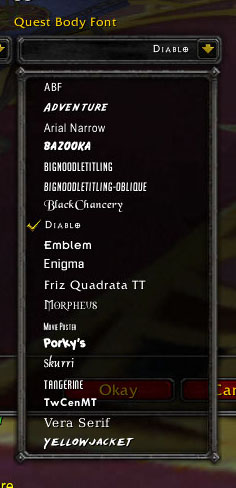
The LSM30_Font widget

The LSM30_Sound widget (and yes you can preview the sound by clicking on the speaker)

The LSM30_Statusbar widget

The LSM30_Background widget

The LSM30_Border widget


-

yssaril Owner